

🪄 Simple mode · free · no watermark
Make a fun video in minutes
Pick a template, drop in your photos and words, add stickers and music, and share it. As easy as making a card: for families, kids, friends and your first videos.
- 1,000+ templates
- Works on your phone and computer
- Your photos stay on your device
Three easy steps
-
1
Pick a template
Birthdays, weddings, kids, travel, festivals, Reels and more. Watch them play before you choose.
-
2
Make it yours
Tap a photo to swap in yours, type your own words, and add stickers, emojis and music.
-
3
Save and share
Save your video and share it on WhatsApp, Instagram, TikTok or YouTube. No watermark.
A template for every moment
Tap one to start with it. Your photos and words go in, the music and animations are ready.
Fun things to add
- 🌟Cute stickersHundreds of stickers: animals, party, love, food and more.
- 🔤Fun textBright titles that bounce, pop and glow.
- 🎵Music and soundsHappy music and funny sound effects, free to use.
- 🎨Filters and effectsOne tap for a new look: warm, dreamy, retro or sparkly.
- 🎬Smooth changesFades, zooms and slides between your photos.
- 🎤Record yourselfAdd your voice or a camera clip right in the app.
Big friendly buttons, your colours
Simple mode keeps just the easy tools, with 10 colour themes. Try one: this page changes too.
🎛 Advanced mode
Want the full studio?
Switch to Advanced for a multitrack timeline, automatic captions, voice clean-up, background removal, a music composer with 38 instruments, a mixing desk, MIDI and more. Your projects work in both modes.
Ready to make something?
Free for everyone. No watermark and no limits.
Free online video editor & audio composer
Edit video, compose music and mix audio in your browser
Start from 1,100+ ready-made templates or a blank timeline, then cut, caption and polish videos, clean up voices, compose music for 38 instruments and mix it like a studio, right in your browser (or install it as an app on your device). Your media files are edited on your own computer and are never uploaded.
See what it can doFree · No watermark · No limits · No download needed · Works in Chrome and Edge on your computer · Install it as an app if you like · Android app on Google Play
By signing in you agree to the Terms and conditions and Privacy policy. Signing in links basic usage, a few small frames of each video you add and a short sample of each audio export (for content review), and a copy of each exported project file with preview images, to your Google or Apple account.
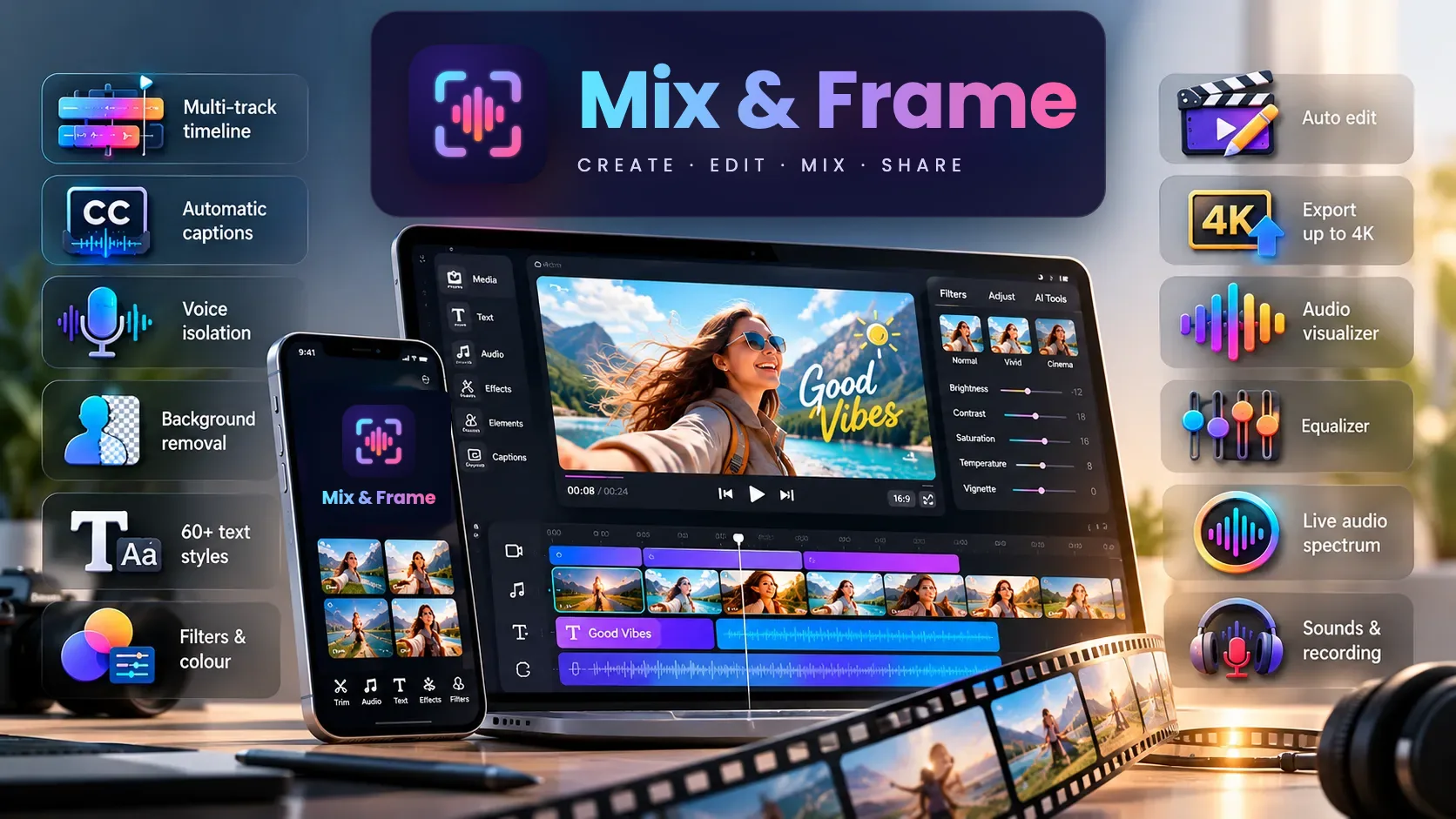
Everything you need to make great videos and music
A full timeline editor, a music composer and a mixing desk, with on-device AI, ready in a browser tab.
-
1,100+ templates
1,000+ video templates — Reels, YouTube intros, trailers, birthdays, weddings — and 400+ audio templates for podcasts, music (Western, Indian and East Asian), mixing and sound effects. See templates
-
Multi-track timeline
Trim, split, move and layer video, photos, text and sound. Speed, reverse, freeze frames, transitions and keyframes.
-
Video from documents
Turn a PowerPoint, PDF, Word document or Excel sheet into a video: slides and pages become clips, with animations, transitions and the speaker notes as captions. How it works
-
Automatic captions
Speech is turned into timed captions on your computer, ready to restyle and edit.
-
Voice isolation
Separate a voice from music and background noise with AI, plus noise reduction for cleaner speech.
-
Background removal
Cut a person out of their background without a green screen, or use chroma key when you have one.
-
100+ text styles
Creator captions, aesthetic, vlog, meme, gaming, party, neon and retro looks, with 22 bundled fonts, stickers and animations.
-
Filters & colour
Cinematic filters, LUTs, colour adjustments, blur, masks and blend modes.
-
Auto edit
Edit by text: delete words in the transcript and they are cut from the video. Split at scene changes, remove silences and lower music under speech automatically.
-
Export up to 4K, no watermark
MP4 video from 480p to 4K at your chosen frame rate, rendered on your own computer. No watermark and no limit on how many you export.
-
Audio visualizer
23 spectrum styles that move with your sound: bars, waves, circles and retro meters, with left and right channels shown separately.
-
Equalizer & live spectrum
10-band EQ with 20 presets for voice and music, on one clip or the whole mix, with separate left and right channels, and a live spectrum with level meters that show clipping.
-
Audio mixer & compressor
A 4, 8 or 16-channel mixer: faders, pan, mute and solo, filters, reverb, delay and a compressor on every track, a master limiter against clipping, L/R meters and loudness in LUFS.
-
Pitch & music key
Find the key of any song, like A minor, then move it to another key or match another song, keeping its speed. Pitch and key at a glance in their own window.
-
Music composer
Write music for 38 instruments by typing notes and chords, build beats on a drum grid, and play Indian rhythms on tabla, dhol, dholak and mridangam. See the composer
-
Score my edit
Original music written for your cuts in one click: the beats land on your scene changes, the melody steps aside when someone speaks, and it ends on your last frame. Pick a mood, and every note stays editable.
-
Hum it, beatbox it
Hum, sing or whistle a tune and it becomes notes for any instrument, in tune and in time. Beatbox “boom, ka, ts” and it becomes a drum pattern, even on tabla or dhol.
-
Drum with your phone
Swing your phone like a drum stick and every strike plays: aim left for the hi-hat, ahead for the snare, right for the crash, lower for the kick, or choose your own move for each drum. Record a loop, then add each drum in layers while it plays.
-
Song to instrument tracks
On-device AI turns a song into drums, bass, chords and melody tracks that follow its timing. Swap the instruments, fix notes, or make it your own arrangement.
-
MIDI files in and out
Open a .mid file and every part becomes an instrument track you can play and edit, or save your tracks as MIDI for GarageBand, FL Studio, Ableton or MuseScore. MIDI editor
-
Sounds & recording
Add music and sound effects from the built-in library, or record your voice, camera or screen right in the app.
New · Simple or Advanced
Easy for beginners, everything for pros
- 🪄 Simple mode: just the easy tools, big friendly buttons and your choice of 10 colour themes. Pick a template, add your photos, text, stickers and music, and your video is done. Great for kids, families and first videos.
- Tap a clip for a few clear settings: the words and a colour, a fun font, the size, the volume, slow or fast, and how it comes in and goes out (fade, zoom, slide, pop or spin). Cut and delete right from the panel.
- Start Here also opens a simple tuner and metronome for music practice.
- 🎛 Advanced mode: the full video and music studio. Audio projects, the multitrack mixer and equalizer, recording, instruments, MIDI, pitch & key, keyframes, captions, auto edit and all the musician’s tools.
Choose when the editor first opens, and switch any time with one button at the top. Your projects are the same in both modes: nothing is lost when you switch.

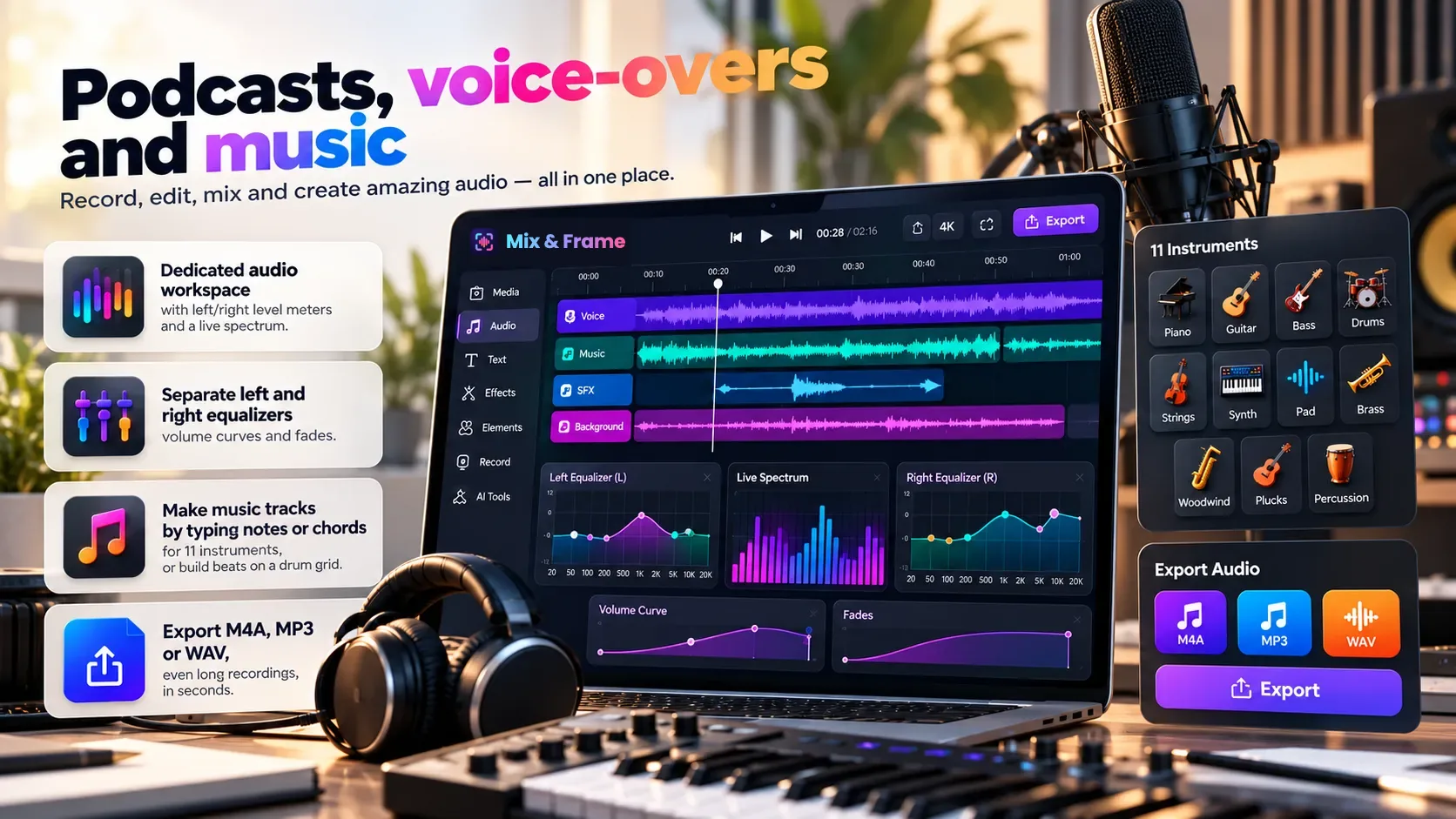
Audio projects
Podcasts, voice-overs and music
- A dedicated audio workspace with left/right level meters and a live spectrum.
- Separate left and right equalizers, volume curves and fades, and a full audio mixer.
- Find the key of a song and change it, or match two songs’ keys, without changing their speed.
- Compose music tracks by typing notes or chords for 38 instruments, or build beats on a drum grid.
- Hum a tune or beatbox a beat into the mic and it becomes an instrument or drum track.
- Play drums with your phone as the drum stick, and build a beat in layers.
- Export M4A, MP3 or WAV, even long recordings, in seconds.
For composers · Music and audio
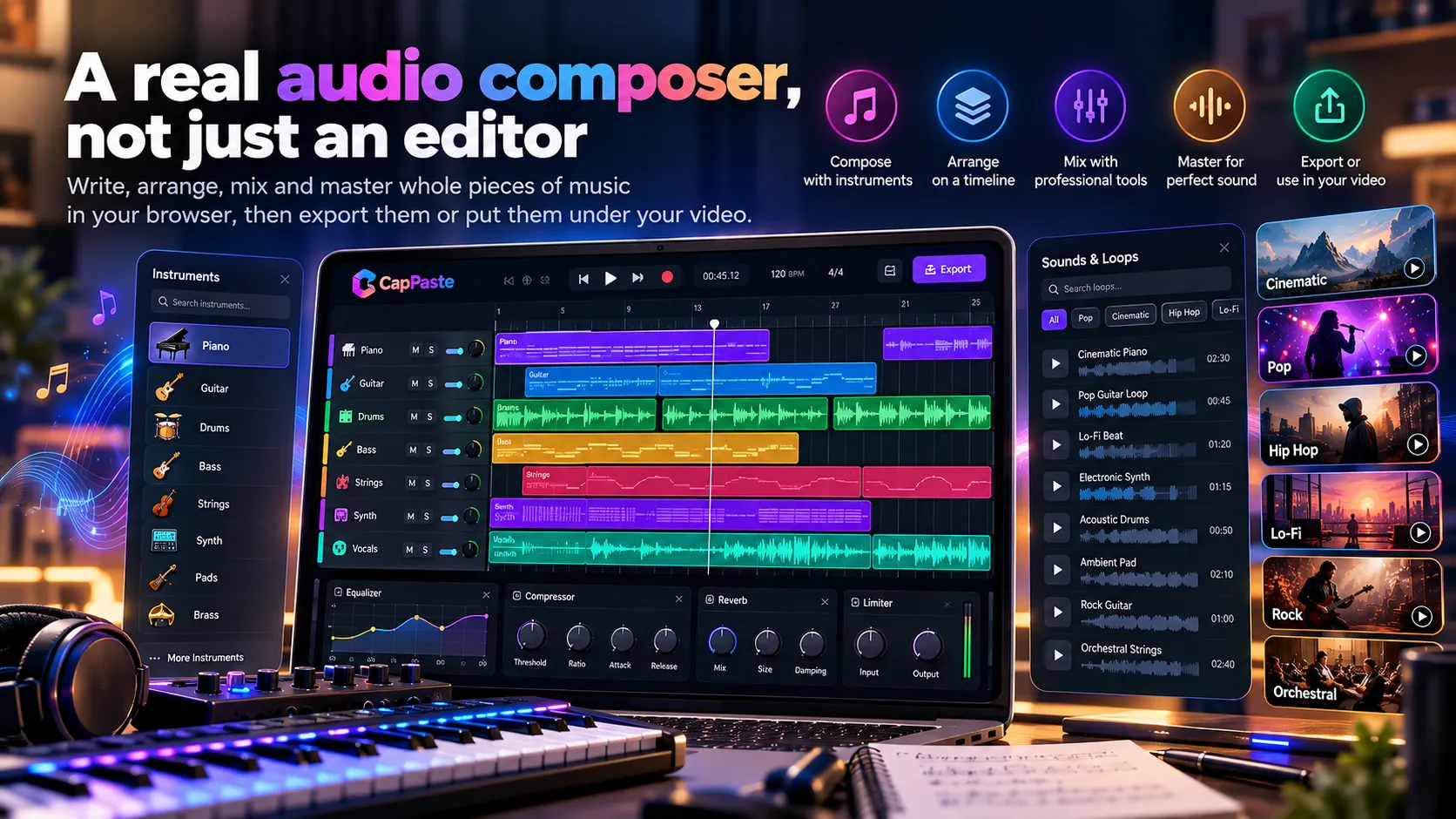
A real audio composer, not just an editor
Write, arrange, mix and master whole pieces of music in your browser, then export them or put them under your video.
-
38 instruments
Piano, electric piano, electric and pipe organ, strings, violin, cello, harp, acoustic and electric guitar, bass, 808 sub bass, brass, saxophone, synth lead and pad, flute, bells and marimba — plus sitar, veena, sarod, sarangi, tanpura, santoor, bansuri, shehnai, nadaswaram, harmonium, jaltarang, koto and erhu, and tabla, dhol, dholak and mridangam.
-
Type notes and chords
Write melodies note by note (C5, rests, ties) or chords like Am7 and G/B, set the tempo and repeats, or write Indian melodies in sargam.
-
Drums, tabla, dhol and taals
Build beats on a step grid with accents and swing, start from rock, hip-hop, house or funk, play Teentaal and Keherwa on tabla, bhangra on dhol, bhajans on dholak, or Adi talam on mridangam.
-
Multitrack arranging
As many instrument, voice and sound tracks as you need, each with its own clip EQ, voice effects, fades and volume curves.
-
Mix and master
Channel and master compressors, a master limiter, 10-band EQ with 21 presets, reverb, delay and stereo width, with a LUFS meter for streaming loudness.
-
400+ audio templates
Start from arrangements, raags, Bollywood and devotional pieces, beats, podcast and mixing presets in 78 categories — every one is ordinary tracks you can edit.
-
Hum a tune
No keyboard needed: hum, sing or whistle a melody and it is written as notes, tuned even if you hum a little flat, put in key, at the tempo you hummed it. Then play it on piano, strings, sitar or any instrument.
-
Beatbox a beat
Make the beat with your mouth — “boom” for the kick, “ka” for the snare, “ts” for the hi-hat — and it lands on the drum grid, accents and all. On tabla, dhol, dholak and mridangam it plays their strokes.
-
Phone as a drum stick
On a phone, swing it like a stick and each strike plays at once, louder when you hit harder: aim left, ahead or right for the hi-hat, snare or crash, lower for the kick. Record the kick, then add the snare and hi-hat in layers over the loop.
-
Music for your video
Score my edit writes original music for your video in 8 moods, fitted to its cuts, speech and length, as instrument tracks you can change note by note. Make another for a new take.
New · Audio mixer
Mix every track like on a real desk
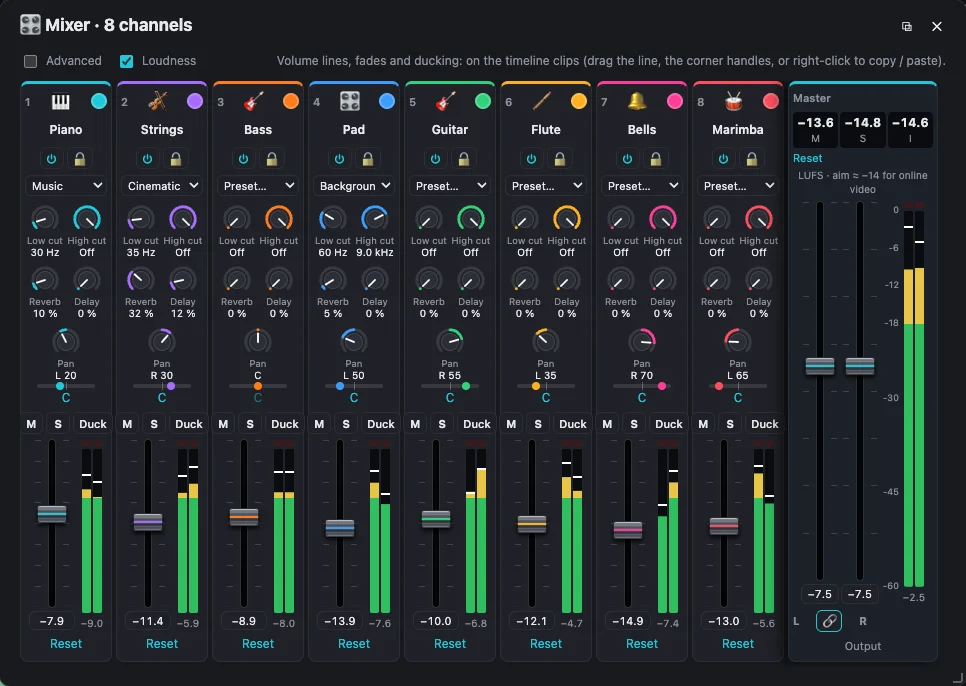
- One click on 🎛 Mixer connects all your audio tracks: 4, 8 or 16 channels, with a master that has its own left and right faders.
- Faders, pan, width, mute, solo, on/off and lock for each track, with its own name, colour and icon.
- Low cut and high cut filters, reverb and delay, plus presets for voice, podcast, music and cinematic sound.
- A compressor on every channel and on the master, a master limiter, left and right meters with peak-hold and clip lights, and loudness in LUFS to hit −14 for online video.
- Ducking, volume curves and fade handles; everything you hear is exactly what you export.
New · MIDI files
Open, edit and create MIDI
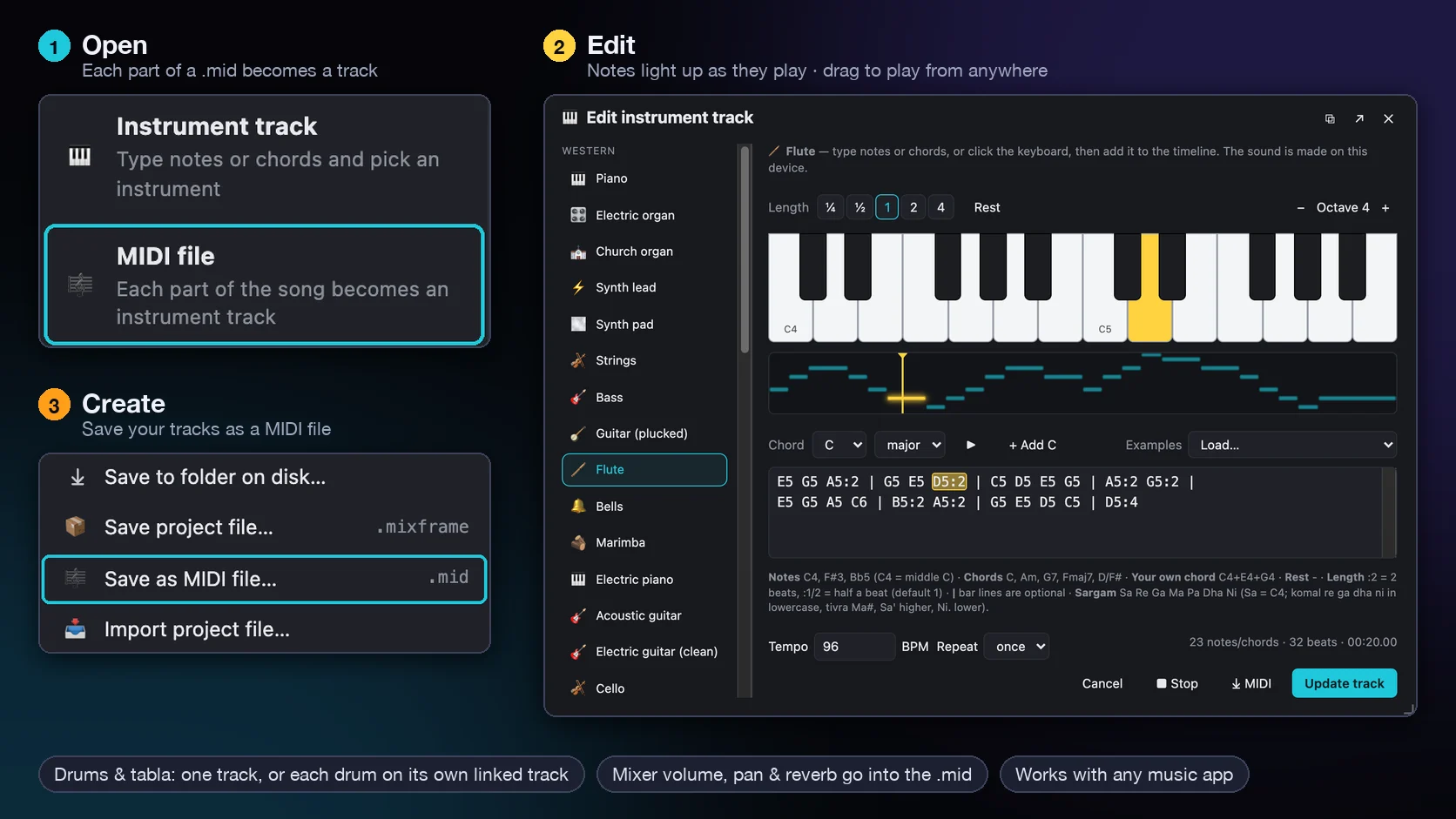
- Open any .mid file: + Add media → MIDI file, Import files, or drop it on the timeline. Each part becomes an instrument track on its own audio track, following the song’s tempo, with drums on the drum kit.
- Edit the notes as text or on the keyboard, and change any part to another of 38 instruments. While it plays, the keys, the notes strip and the note in the text light up in yellow; drag the yellow line to play from anywhere.
- Drums and tabla go on one track, or each drum on its own linked track, so the kick, snare and hats each get their own channel in the mixer.
- Create a MIDI file from your project with Save as MIDI file… in the menu, or one track with ⤓ MIDI: General MIDI instruments, and the mixer’s volume, pan and reverb, ready for any music app.
New · Two or three screens
Edit and play on more than one phone
- 📱 Second screen: one phone (or computer) keeps the project, the preview and the sound; another shows the timeline full screen, or the panels. Edit on either and both change at once.
- From the timeline phone, play, pause, drag the playhead, undo and redo: the video plays on the main screen. Tap a clip and the main screen shows its settings and preview.
- ✨ Effects for a moment of the video: mark 1:00.00 → 1:00.05 and zoom in to a face, move across the picture, blur a number plate or spotlight one person.
- 🎹 Play together like a real keyboard: one phone plays the bass and chords with the left hand, the other the melody. Or share a drum kit: kick and snare on one, hi-hats, cymbals and toms on the other. Every part is recorded on its own track.
Join once with a 5-digit code on the same Wi-Fi or a phone’s hotspot: the phones stay joined, even through a Wi-Fi hiccup, until you press Stop. Each joining phone gets its own copy of the project, named with its number. Free, in the browser or the Android app.

New · Musician’s tools
A tuner, metronome, chord finder and more, built in
Press Tools at the top of the editor (on a phone, where the project’s name is) and pick a tool (sign in, free, to use them). Each one opens in its own window beside your edit, and listens or plays right on your device.
-
Tuner
Tune a guitar, bass, ukulele, violin, cello, mandolin, banjo, sitar, tanpura or oud with your microphone: it finds the string you play and shows how far to turn it. Name your instruments and keep each one’s tuning history, before and after, with notes.
-
Metronome
Any tempo from 20 to 300 BPM, or tap it in. Time signatures from 2/4 to 12/8, beats you make accented, normal or silent, and eighths, triplets or sixteenths, with lights to see the beat. Save your settings by name and pick them next time.
-
Pitch detector
Sing or play and see the note and its frequency, whether you are sharp or flat on a needle, how steadily you hold it, and a trace of your pitch over the last few seconds.
-
Spectrum analyzer
Live frequencies from 20 Hz to 20 kHz with a peak-hold line, the loudest frequency, peak and RMS level in dBFS, and a clip light that counts every time the sound distorts. For musicians and audio editors.
-
Tone generator
Pure sine, square, triangle and sawtooth tones at any note (with your tuning reference) or frequency, test tones for bass and speakers, and sweeps low to high or high to low, logarithmic or linear. See the waveform, and save any of it as a WAV or MP3 file.
-
Chord finder
Guitar and ukulele chord charts for every major, minor, seventh and extended chord, with other shapes up the neck. Tap the frets to name a chord, get progressions in any key with the chords that usually come next, and hear every chord played.
New · Video from documents
Turn slides and PDFs into a video
Have a presentation, a guide or a report? Add the file and Mix & Frame lays it out on the timeline for you, ready to narrate, add music and export.
From a PDF, Word or Excel
Every page becomes a picture clip: choose the pages, how long each one shows, a transition and a slow zoom. The video can take the pages’ shape. Word documents and Excel sheets work the same way, page by page.
From PowerPoint
Add a .pptx and each text box, table, chart and picture becomes its own clip on its own track, in its exact place, so you can move, re-time or restyle any of them. Or keep one picture per slide.
Animated for you
Keep the presenter’s own entrance animations and transitions, or let Auto animate bring in the title, then each part. Speaker notes become captions, and slide timings and sounds come along too.
New · 1,000+ video and 400+ audio templates
A finished video in minutes — start from a template
Pick a design, swap in your photos and words, and export. Every template comes with its own animated titles, stickers, transitions and royalty-free music.
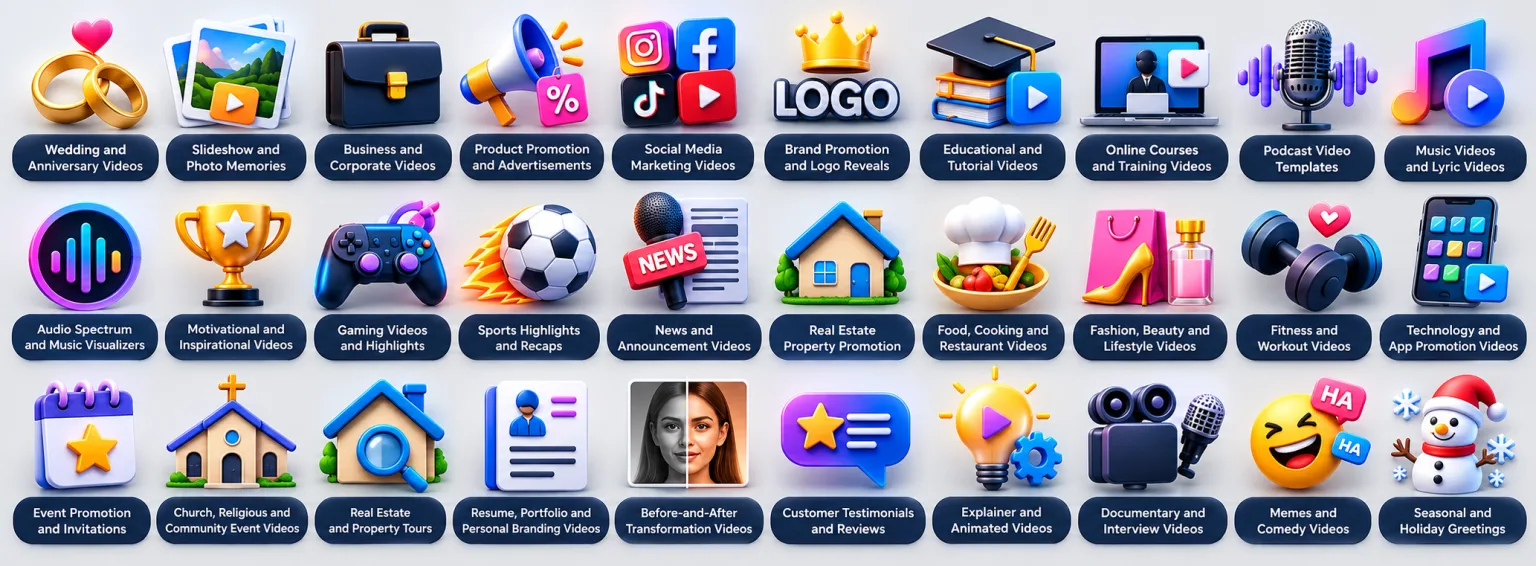
- 44 video categories: Reels and Shorts, YouTube intros and end screens, TikTok trends, movie trailers, travel, birthdays, weddings, product ads, business, real estate, food, fitness, holidays and more.
- Every size: 16:9 for YouTube, 9:16 for Reels, TikTok and Stories, 1:1 and 4:5 for feed posts — filter by the shape you need.
- 78 audio categories: podcast intros and full episodes, voice-overs, background and cinematic music, beats, drum patterns, Indian classical, Carnatic, Bollywood, ghazal and qawwali, folk, bhajans, tabla rhythms, Japanese and Chinese music, mixing and EQ presets, sound effects and more.
- Watch before you choose: every template plays with its music right in the gallery.
- Make it yours: click a photo slot to replace it, retype any title, and change the music — it’s a normal project you can edit freely.
- Keep your favourites and recently used templates one click away, on any device.
Free for everyone
Every tool free. No paid plan, no catch.
Mix & Frame is completely free, with no watermark, no export limits and nothing locked behind a subscription. The tools that other apps keep for paying users are here for everyone.
Built for bigger edits
Go beyond short clips. Make full YouTube videos, tutorials, vlogs, music videos and slideshows on a multi-track timeline, with captions, filters, transitions, background removal and up to 4K export.
A real studio for your sound
More audio tools than a typical video app: a mixing desk, equalizer, compressor, voice clean-up and a music composer with 38 instruments. Make podcasts, voice-overs, songs and sound for your videos.
Make anything by hand
Templates are a quick start, not a limit. Every effect, animation and sound the templates use is yours to use directly, so you can build any kind of video or audio yourself.
An honest note about templates
Because Mix & Frame is free, we only use music and designs we are allowed to share. So you won’t find licensed hit songs or paid template packs here yet, and our template library is smaller than the big paid apps. It grows with every update.
Help Mix & Frame grow
Made a template, a track or a sound you own and would like to share? Have an idea for templates you’d like to see? Write to support@mixandframe.com. And if you like Mix & Frame, tell your friends: every new creator helps us add richer templates for everyone.
Learn · Create · Stand out
Learn real editing. Make it yours.
Mix & Frame is not a one-tap AI generator. It is a full video editor and sound studio where you learn the craft and make videos and audio that are truly your own.
A free place to learn
- Learn video editing by doing it: cutting on a multi-track timeline, timing to music, transitions, titles, captions and colour.
- Practise on a mixing desk laid out like real studio equipment: faders, pan, low and high cut filters, compressors, a limiter, level meters and loudness in LUFS. The same skills work on a real desk in a studio, a church or on stage.
- Compose music with 38 instruments and see how beats, bass, chords and melody fit together.
- No trial running out: practise as long as you like, for free.
Create, don’t just generate
- Why stick to AI-generated content? Clips made by one prompt look like everyone else’s. Your own edit doesn’t.
- Use your creativity: your ideas, your timing, your voice. Audiences notice when something is made by a real person.
- Show your talent: sing, play, speak, dance or film, then shape it into something only you could make.
- AI does the boring parts (captions, voice clean-up, background removal, finding the beats) so your time goes into the creative ones.
Private by design
Your media stays on your computer
Videos, photos, audio and PDFs are opened and edited inside your browser. The AI features run on your own computer too, so your files are not sent anywhere to process them. Only PowerPoint, Word and Excel files you turn into video visit our converter, and are deleted straight after.
Projects you control
Save projects to a folder you choose or to browser storage. Exports are made on your computer and saved or downloaded by you.
What we keep
Your Google or Apple account details and usage, a copy of each exported project file, and small preview frames and audio samples for content review. Details are in the privacy policy.
Start in three steps
- Create a project (video or audio only) or pick a template, and drop in your files.
- Sign in with your Google or Apple account when you start.
- Edit and export, then download your video or audio.
Questions
Is Mix & Frame free?
Yes, free with no limits: no trial, no export cap and no paid plan. Sign in with a Google or Apple account and start editing. Nothing you export has a watermark: videos, GIFs and audio come out clean.
Can I use two phones on one project?
Yes. On the phone with the project, open the menu (or tap 📱 Screen next to Export on a phone) and choose This phone has the project; it shows a 5-digit code. On the other phone choose Be a second screen, pick Timeline or Panels and type the code. The first phone keeps the preview and the sound; edit, play and move the playhead from either. To make music together, open an instrument on both and press 📱 Play together: one phone plays the left hand, the other the right, or split a drum kit between you.
Can I zoom in or blur just part of a video?
Yes. Mark the seconds with ⟷ Work area and press ✨ Effects: an Effect clip covers that time. Choose Focus on a spot, Zoom in, Zoom out or Move across and drag the box on the preview to where to look, or blur inside or outside a box (a face, a number plate) and add a spotlight. Drag the clip’s ends to change when it plays.
Can I make a video from a template?
Yes. Open Templates and browse more than 600 video designs in 54 categories, from Reels and YouTube intros to birthdays, weddings and movie trailers. Previews are free to watch without an account; sign in when you choose one, then replace the photos and words with your own.
Can I edit a video by editing its text?
Yes. Open the Transcript tab and click Transcribe: what is said in your video or podcast appears as text, written on your own device. Select words (or long pauses) and press Delete, and they are cut from the picture, sound and captions together. Find words picks every place a word is said, so you can remove them all at once, and Undo brings anything back.
Can I make a video from a PowerPoint or PDF?
Yes. Choose Create project → Video from documents, or just add the file to any video project. A PDF becomes a slideshow, one clip per page, with transitions and a slow zoom. A PowerPoint (.pptx) can be pulled apart into separate tracks for text, tables and graphics, with its animations (or automatic ones), transitions, sounds, and the speaker notes as captions. Then add your voice and music and export. A Word document or Excel sheet becomes a slideshow of its pages, like a PDF. Using Keynote or Google Slides? Export it as PowerPoint or PDF first.
Can I compose music with it?
Yes. Make an audio project (or add tracks to a video) and write music for 38 instruments by typing notes and chords, build beats on a drum grid or play taals on tabla, then mix it with compressors, EQ and a limiter and export M4A, MP3 or WAV. More than 550 audio templates give you a start, including raags, Bollywood, devotional, tabla, fusion, Japanese and Chinese music.
Can I find and change the key of a song?
Yes. Select the music on the timeline and click 🎼 Pitch & key (or the clip’s Audio tab), then Find the key: it listens on your own device and names the key, such as A minor. Pick Change key to to move it to another key without changing its speed, or Match the key of to fit it to another song in your project.
Can it write music for my video?
Yes. Click 🎶 Score my edit above the timeline and pick a mood, such as Upbeat, Calm or Cinematic. It reads your cuts (and scene changes inside long clips), where people speak and how long the video is, then writes original music at a tempo where the cuts land on the beat: lighter under speech, with a held chord on your last frame. It goes on linked Score tracks, and Make another gives a new take. Nothing is uploaded and the music is yours to use.
Can I hum a tune or beatbox a beat to make music?
Yes. Choose + Add media → 🎤 Hum a tune (or 🎤 Hum it in an instrument track’s window), press Start and hum, sing or whistle after the count of 3: it becomes notes for that instrument, tuned and in key, at your tempo. On a drum kit press 🎤 Beatbox it: “boom”, “ka” and “ts” become the kick, snare and hi-hat on the step grid. It all happens on your device.
Can I play drums with my phone?
Yes. On a phone, open a drum kit (or tabla, dhol, dholak or mridangam) and press 📳 Drum with your phone. Hold the phone like a drum stick: your first strike sets straight ahead (the snare), aim left for the hi-hat, right for the crash and strike lower for the kick, or choose your own move for each drum with ⚙ Moves (even one you teach it). Each strike plays at once, and the screen stays upright while you play. Press ● Record for a loop of 1, 2 or 4 bars to a click, then + Add a layer to add each drum while the loop plays.
Is there a guitar tuner?
Yes. Press Tools at the top of the editor and choose Tuner (sign in, free). It tunes guitars (standard, drop D, open G, DADGAD and more), basses, ukuleles, violins, violas, cellos, mandolins and banjos, sitars, tanpuras, sarods, veenas, ouds, bouzoukis and balalaikas (Indian instruments with your own Sa and sargam string names), or any instrument note by note. Play one string at a time: it finds the string and shows how many cents it is off and which way to turn it. Add your instruments by name, like “My guitar-1”, and save each tuning to its history with the date, every string’s before and after, and a note.
Are there guitar and ukulele chord charts?
Yes. Press Tools and choose Chord finder: chord charts for guitar and ukulele for every root and for major, minor, seventh, sixth, added and extended chords (9th, 11th, 13th), with other ways to play each one up the neck. Tap the frets or pick notes to find a chord’s name, choose a key for common progressions and to build your own (the chords that usually come next light up), and play any chord or progression.
Can I make test tones and sweeps as audio files?
Yes. In Tools → Tone generator, make a sine, square, triangle or sawtooth tone at any frequency or note, white or pink noise, or a frequency sweep (low to high or high to low, logarithmic or linear, your own start and end), see its waveform, and save it as a WAV or MP3 file at the length and level you choose. Free, with no sign-in.
Is there a metronome?
Yes. Press 🧰 Tools in the top bar and choose Metronome: 20 to 300 BPM, tap tempo, time signatures from 2/4 to 12/8 (with 5/8, 7/8 and 9/8), accented, normal or silent beats, and eighths, triplets or sixteenths between them, with flashing lights and a choice of sounds. Save your settings with a name and pick them next time. Tools also has a pitch detector for singing practice, a spectrum analyzer with peak, RMS and clipping, a tone generator that saves tones and sweeps as WAV or MP3, and a chord finder with guitar and ukulele chord charts.
Can I open and make MIDI files?
Yes. Add a .mid file from + Add media → MIDI file (or drop it on the timeline) and every part becomes an instrument track you can play, edit and mix. To make one, choose Save as MIDI file… in the menu: your instrument tracks, as placed on the timeline, with the mixer’s volume, pan and reverb, for any other music app.
Do I need to install anything?
No. Mix & Frame runs in your browser. Use a recent Chrome or Edge on a computer for the best experience; AI models download once the first time you use them. If you like, you can also install it as an app on your device (see below).
Can I install Mix & Frame as an app on my device?
Yes, free. Click Install app at the top of this page or All apps & downloads (in the editor: logo menu → Install Mix & Frame app): one window with every way to get it, from your browser, Google Play, and the Windows, Mac and Linux apps. Chrome and Edge install it in one click on Windows, Mac, Linux, ChromeOS and Android; in Safari choose File → Add to Dock on a Mac, or Share → Add to Home Screen on iPhone and iPad; Firefox installs it on Android (⋮ → Add app to Home screen) but not on a computer. Mix & Frame then opens from its own icon in its own window, updates itself, and opens even without the internet. Signing in and exporting still need a connection.
On Windows, Mac and Linux you can also download the desktop app (Install app → Computer app: .exe for Windows, .dmg for Mac, AppImage or .deb for Linux). It is a normal app with a menu bar, and always runs the current Mix & Frame.
Are my videos uploaded?
No. Your media files are edited on your computer. The one exception is a PowerPoint, Word or Excel file you turn into a video: to draw its slides or pages exactly, it is sent to our converter and deleted straight after (PDFs are opened on your device). A copy of each exported project file (the edit, not your media), small preview frames and short audio samples are kept for content review, as explained in the privacy policy.
Does it work on a phone?
Yes. On a phone the editor fits the screen: the preview at the top, the timeline below it, and a toolbar of big buttons along the bottom for media, sounds, text, captions, transcript editing, auto edit, stickers and filters, each sliding up over the timeline. On Android you can also get the Mix & Frame app on Google Play. Long or detailed edits are still easier on a computer with a bigger screen, keyboard and mouse.
What can I export?
Video projects export MP4 from 480p to 4K. Audio projects export M4A, MP3 or WAV.
Ready to make something?
Free, with no watermark and no limits.